Twitter RSS
magnify
formats

RV Site Builder; Is it any good?

RV Site Builder claims that its site building software, installed directly into cPanel, is simple for non programmers to use. If an easy to manage web presence is important to you, this may be the software for you.

An easy way to create, market, and even maintain your website is a must. RV Site Builder is template-based. Searching for a template is best done by executing a keyword search. You pick the template that fits your business best or upload your own design. You can also download one of the RV Site Builder templates, change it to your specifications, and upload it for use.

This site builder is, in fact, simple to use. There’s a wizard to walk you through set up so bringing your site to life takes only moments. One of the big advantages to having a site builder is that you can be in charge of updates yourself. You also won’t be paying a designer to create your graphics from scratch.

Version 5 of RV Site Builder includes social media plug-ins. You can browse images from Facebook and even link all of your social media sites to your website. This kind of integrated web presence is essential given the recent changes in search engine optimization that Google brought to the table in June and July. Your website rankings will be based on many top-secret factors, but experts speculate that high quality up-to-date content is important, as is establishing your site as a “trustworthy” source of information. Keeping your social media sites linked with your website is a big help in that arena.

If your site is ecommerce focused, you should know that although RV Site Builder’s options are somewhat limited, you can link your site to your Paypal account.

The Site Builder is included free with all Blackfoots’ shared hosting plans. Please feel free to try the online demo here.

For more information on which software may be best for your site management needs, please contact us.

 
Tags:
 Share on Facebook Share on Twitter Share on Reddit Share on LinkedIn
No Comments  comments 
formats

New Feature: Dkim Email Signing

Published on June 8, 2012 by in Email, New Features

I’m pleased to announce that the latest upgrade to our hosting account control panel software adds the option of DKIM signing for outgoing email. DKIM is a technical method by which outgoing email sent via your hosting account is digitally signed, recipient email servers can then check this signature to determine whether an individual email has actually been sent by your account and allows over time a reputation to be built up that this signature is associated with the transmission of good quality / legitimate mail. From the DKIM FAQ:

  • Will using DKIM improve my deliverability and guarantee that my marketing mail goes directly to the recipients’ inbox, bypassing any spam filters?

“Whether this improves deliverability or bypasses filters is entirely at the discretion of the validating receivers. When a message has been signed using DKIM, a receiver uses their knowledge about the signer to determine the most appropriate treatment of the message. It is expected that messages from a signer who has a good reputation will be subject to less scrutiny by the receiver’s filters.”

As such, providing your outgoing email is legitimate and of high quality, DKIM could increase the deliverability of your messages.

Enabling DKIM is very simple, please navigate to the “Email Management Tools / Email Authentication” section of your hosting account control panel.

The new DKIM feature completely replaces the similar “Domainkeys” option, essentially the DKIM standard is an evolution of the original “Domainkeys” implementation and should be supported by a greater number of recipient mail servers.

 
 Share on Facebook Share on Twitter Share on Reddit Share on LinkedIn
No Comments  comments 
formats

New Service: Multi Year Registrations for .UK Domain Names

Published on May 1, 2012 by in Domains, New Features

UK domains have previously only been available for registration periods of two years at a time. I am pleased to announce this changes as of the 1st May 2012, when you will be able to register your UK domains for flexible periods from a minimum of one to a maximum of ten years.

This is great news as it creates flexibility:

  • for those who want a relatively short registration for a new or temporary project
  • provides reassurance to those with important trading names that they wish to register for as long as possible.

UK domains can now also be renewed at any time within their lifecycle, so if you’ve just purchased a domain for an initial two year period but now want to extend this by an additional eight years to reach the maximum registration period of ten years - this is now possible via your billing account.

We hope you find this new service for your domain registrations helpful, however if you have any questions please do drop us a line.

 
 Share on Facebook Share on Twitter Share on Reddit Share on LinkedIn
No Comments  comments 
formats

Blackfoot - a great place to be for domain registrations!

Published on March 28, 2012 by in Domains

Nominet (the UK domain registry) are running another promotional prize draw (details over at agreatplacetobe.co.uk). Anyone who buys or renews a co.uk, .org.uk or .me.uk domain between today (28th March) and the 26th April will be automatically entered into a daily prize draw to win an iPad.

The promotional website above links through to their guide to choosing a registrar - they make a number of good points you should be aware of when purchasing domain names, including;

  • Check that the registrar’s Terms and Conditions for domain name registration confirm that your domain name will be registered to you in your name and not in the name of the registrar or another third party.

Every domain registered at Blackfoot is registered to the details you input when placing your order.

  • Pay particular attention to your rights to move your business and your domain name to another registrar, and whether there is a charge for doing so.

Every active domain registered at Blackfoot can be freely transferred away with no charge made by ourselves.

  • Seek recommendations from other Internet users and ask the prospective registrar for testimonials from other customers.

Our testimonials page can be seen here

  • Confirm whether you are dealing with a reseller of the registrar, or the registrar themselves and how you can contact them in the future if you need support.

We are a Nominet member and as such all of our UK domain registrations are with the UK domain registry directly and not via a reseller. We can be contacted at any time via our client portal

  • Overall, you should shop around to find a registrar that provides the service or range of services you need.
  • Get competitive quotes - but remember, the cheapest price is not necessarily the best deal. Check your contract for any ‘hidden’ charges.

Not only do we offer very competitive pricing for domain registrations, but your domain is always yours to do with as you please. You can update your domain at any time via our billing system with new name servers to direct it to another host, or if you require a website, email, or DNS service consider one of our own hosting accounts. We also provide VPS servers for those with more advanced needs.

If you have any other queries before buying your domain please feel free to submit them via our helpdesk

 
 Share on Facebook Share on Twitter Share on Reddit Share on LinkedIn
No Comments  comments 
formats

MX Records

Published on March 1, 2012 by in Email, General

Mail Exchanger records (MX records) specify which mail server is responsible for the email of a particular domain. You may well be pleased to know that most customers will never have to touch them!

However if you are putting in place a more complex setup, wishing to direct your incoming email to, for example, your own local mail server, modifying your MX record is often the best way to do it.

This is one of the more complex topics we deal with on the helpdesk, so please find a brief guide below.

Read more…

By default on a new account with Blackfoot the server will assume that we will handle incoming email for your domain. If this is not the case (and we are hosting the DNS for your domain) you can manage the MX record for your domain using the ‘MX Entry Maintenance’ section within the hosting account control panel http://yourdomain.com/cpanel

1. Changing the MX Record

If you would like to use a different mail server to handle incoming email, you can edit the current MX record. Please ensure that you have specified a fully qualified domain name (FQDN) as it is not possible to have an MX record pointing directly to a numeric IP address.

If you only have an IP address, the “Simple DNS Zone Editor” should first be used to create a FQDN pointing to that IP address for example remotemail.yourdomain.com or similar that you can use as your MX record.

When entering a new MX record you will also need to enter the priority you require for that mail server.

Lower values denote higher priority, thus, a mail server with priority 0 is always preferred over all other listed mail servers. Please note spammers will often target lowest priority email servers, as these may be backup servers with little protection, so you may wish to ensure that you are updating all your mail servers with the same anti-spam configuration.

2. Changing the Routing

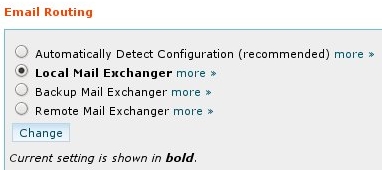
Email Routing

Specify how the server should deal with mail it receives for your domain

The control panel also allows you to set the routing for your domain (or how the server will deal with any emails it receives). The settings available are:

  • Automatically detect routing - The server will attempt to guess the correct setting based on the MX entries you have entered.
  • Local - The server will deliver all email it receives locally (i.e into mailboxes you have created within your hosting account control panel).
  • Backup - The server will attempt to pass any incoming email to lower priority records. In this way it can act as a backup if your primary server is down. If you choose this option DO NOT create mailboxes in the hosting account control panel.
  • Remote - The server will attempt to route all email by looking up your domain’s published MX Records. No delivery to local mailboxes is permitted.


If you need any help editing your MX records or with your account in general you can contact us via our helpdesk.

 
 Share on Facebook Share on Twitter Share on Reddit Share on LinkedIn
No Comments  comments 
formats

New Year Spring Cleaning

Published on January 26, 2012 by in General

Okay I’ll admit it, I’m a little late for a new year resolution post and entirely too early for one about spring cleaning, but I’m conveniently choosing to ignore those two facts completely and instead intend to combine the two. From the point of view of a support desk and the queries we see, what are the best resolutions you can make for your hosting account and why is it best to spring clean occasionally?

As a rather untidy person I’ll leave aside uncomfortable questions of what orderliness says about a person’s general mental state, but there are good reasons to review what’s stored on your account:

Read more…

  • Out of date scripting can attract attacks from malicious third parties.
  • It’s a lot easier to manage your account if you know where everything is and what it does.
  • An account that contains only required content generally runs it’s backups a lot faster and the backup will be smaller. If you like to download a copy of your entire account regularly, cleaning up can really save time.
  • You’ll have more room for content you do wish to store, such as backups of photos or other files you’ve uploaded to your account via web disk.


Take a backup of your account

We take backups of each account for disaster recovery purposes, however it’s worth considering whether you wish to take your own backups on a schedule of your own choosing.

It’s a great idea to take a backup of your account before making significant changes, in case you find you’ve deleted something you later find that you need.

We’ll do our best to assist if you suddenly find you need an old file, but we can’t guarantee to have the specific file you need from the specific date.

Remove Unused Script Installs

If you’ve installed scripts using the Site Software feature in your hosting account control panel any you no longer need can be removed just as easily.

Site Software

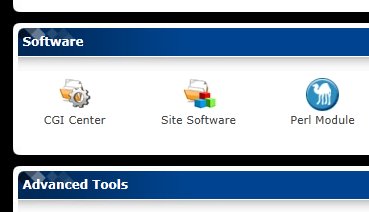
Scripts can be installed and maintained in the Site Software section

Navigate to “Software / Site Software”, click the name of the script you wish to remove. At the bottom of the following page there is an “Uninstall” section where existing installs can be removed.

If you are removing scripts you have installed manually (outside of Site Software), remember to remove the database and associated user after you’ve deleted the script itself. Removing scripts you don’t need means you don’t have to spend time updating them as new versions are released to keep your account safe.


Update Scripts to Latest Versions

While you’re in the Site Software section of your account, check whether any installs you wish to retain need an update. Performing an update will give you the latest and greatest additions to the script in question, but arguably more importantly may well install security fixes for vulnerabilities that have been discovered in the software.

If you have installed scripting manually, you may be able to update it within the software’s own dashboard, alternatively it is likely you will need to download the new version from the developer’s website and apply this update per their instructions (normally via FTP or the file manager in the hosting account control panel).

Don’t forget to also update any plugins, modules, components or themes you may have added over time to your install.

Remove Unwanted Email

Email Account Disk Usage

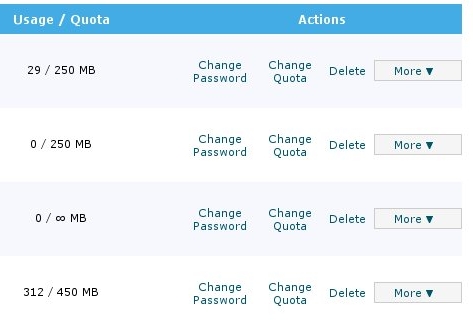
The "add / remove email accounts" section of the hosting account control panel will give you a good idea how much disk space your mailboxes are using.

Good places to check for large amounts of email you might want to delete are the ‘Trash’ folder and if you’ve enabled it, the SpamAssassin Spam Box (‘Spam’ folder).


And before I go…

Default Files

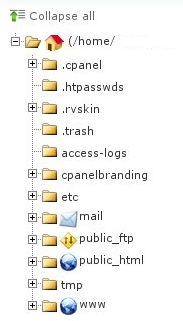
A little note. Feel free to ask us if you’re at all unsure about whether you can safely delete something from your account. Generally speaking you shouldn’t remove anything from the base (root) of your hosting account you did not put there yourself. It’s normal to see a number of directories at this level you did not create.

Generally speaking your own scripts and website content will be present within the public_html folder.

If you have any doubts about where your disk usage is going, please feel free to submit a ticket and we’ll take a look.

If you do find you need more space, all of our accounts can be upgraded via your billing account instantly at any time. For those with even larger needs for storage space don’t forget that we also now provide VPS Packages which come with disk allocations appropriate to a server.

 
 Share on Facebook Share on Twitter Share on Reddit Share on LinkedIn
No Comments  comments 
formats

Keeping Your PC Software Up To Date

Published on December 15, 2011 by in General, Tips

We see a wide variety of issues on our helpdesk, but an increasing number of problems are caused by out of date software on client’s PCs. In today’s constantly connected world updates and more importantly security fixes are published regularly.

You may be aware of ‘Windows Update’ and Microsoft’s regular ‘patch tuesday’ but it’s possible there is software on your PC that isn’t keeping itself up to date and possibly pre-loaded software installed that you weren’t even aware of.

Read more…

Why should I install updates?

Avoid Troublesome Bugs and Malware

Avoid Troublesome Bugs and Malware

On the release of a security patch, nefarious persons will compare the new files immediately against the old to work out how to exploit the vulnerabilities the patch fixes, so that they can attack any PC’s that haven’t been updated. In our experience Adobe Flash, Reader and Java are particularly targeted however any software can suffer security vulnerabilities.

Simply put, out of date software puts your computer and all the activities you perform on it (such as updating your website) and information you store on it at risk.

Is there a solution?

Many software packages now include automatic update routines, we would recommend that these be turned on and set to install any critical or security updates immediately. However auto update routines are not foolproof and are not in place in every piece of software. As such it is increasingly sensible to have software installed that checks for vulnerable versions on your system. Below are examples you may find useful.


Please note that Blackfoot are not in any way associated with or endorse the below utilities and that these are used at your own risk. When installing any software we would advise carefully examining the privacy policy / terms and conditions displayed on installation.

For those on Windows:

Secunia PSI “The Secunia PSI is an invaluable tool for you to use when assessing the security patch state of software installed on your system. It constantly monitors your system for insecure software installations, notifies you when an insecure application is installed, and even provides you with detailed instructions for updating the application when available”. - Secunia ApS 2011.

For those on Linux:

Generally speaking all of your software will be updated via your operating system’s package management system, please see your distribution’s website for further information. The exception would be any software that you have downloaded separately and then installed or compiled yourself.

For those on Macs:

Appfresh ”AppFresh helps you to keep all applications, widgets, preference panes and application plugins installed on your Mac up to date. All from one place, easy to use and fully integrated into Mac OS X”. - metaquark.de 2011.


Keeping your PC up to date can be challenging, but the above utilities aim to make the process simpler. Having up to date software does not make you immune to risk and problems, but should provide some peace of mind alongside your normal anti-virus and firewall applications.


 Share on Facebook Share on Twitter Share on Reddit Share on LinkedIn
No Comments  comments 
formats

The Blackfoot Cloud

Published on November 16, 2011 by in General


We at Blackfoot are pleased to unveil our new Cloud infrastructure - The culmination of many months of work and investment, this will allow us to offer greater flexibility in the service we provide as well as increased performance and reliability.


An important question that’s asked a lot is what exactly is Cloud hosting? Unfortunately there’s no simple answer and if you ask 10 providers you’re liable to receive 10 different answers. Fundamentally however Cloud hosting is the combination of virtual resources to host services that can use part or all of a physical servers available computing power, and clustered servers so that the virtual services being provided can be run from any physical server in the cluster. Essentially this takes the traditional VPS service (where a user purchases a virtual server which shares a portion of physical hardware’s resources) and spreads it across hardware so that a single piece of hardware failing (which is unfortunately a fact of life in the computing world) doesn’t render services running on it unusable.


This provides all sorts of boring technical benefits (along with a few interesting challenges for us geeks) but what it boils down to is where’s the benefit for you the user?


One word: Reliability.


It’s that simple - At Blackfoot we try to keep everything as simple as possible (it’s our motto after all!), so you may not even notice when your website is seamlessly migrated to the Cloud, but once your website is on the Cloud it will simply run better than ever before.


We like to feel we already provide a pretty reliable service, but we also know there’s no such thing as too reliable - We won’t be making exaggerated claims about our Cloud platform providing superhuman infallible service as computer equipment does break and things do go wrong (even Amazon had to truck in lorry-loads of extra gear to a datacentre in Ireland in the middle of the night recently after an entire building full of their cloud servers went offline following multiple power problems!) but our new Cloud infrastructure adds several layers of robustness over our existing service to make problems which affect you, the customer, even more rare than currently.


As an added benefit to our VPS customers, the migration to our Cloud platform removes the current differentiation between guaranteed and burstable memory allocations - Once migrated to the Cloud, your VPS will retain the same amount of total memory as currently but this will all be guaranteed, and so always available to your VPS to use.

 
Tags: , ,
 Share on Facebook Share on Twitter Share on Reddit Share on LinkedIn
No Comments  comments 
formats

What is an SSL certificate and why would I want one?


Secure Your Site


Answer: An SSL certificate allows your website’s users to transmit information to your website on a secure channel. You may want to provide a secure channel to your website if you allow users to


  • Register.
  • Login.
  • Submit personal, confidential or financial information.

Enabling SSL on your website will prevent users on unsecure networks (such as in hotels or public places) having their data intercepted and stolen.

Blackfoot offer a range of SSL certificates at a range of different prices to enable secure information transmission for all types of sites:

  • Hobby web sites / sites for family or friends.
  • Ecommerce Web Stores.
  • The websites of large organisations.

The Basics

  • All Certificates - will cause the padlock icon to be displayed in the visitor’s browser, confirming that any information transmitted to your site is transmitted securely.
  • InstantSSL Certificates - can display a Secure Site Seal demonstrating that the Site/Business identity has been validated by the Certification Authority.
  • Extended Validation Certificates - display the “‘green bar of trust“ in the user’s browser and can also display a Secure Site Seal, demonstrating that the Site/Business identity has been validated by the Certification Authority.

Simple steps to SSL

The process for obtaining an SSL certificate is simple. After your purchase is made you will need to
  • Confirm the identity information you want the SSL certificate to contain
  • Verify your control of the domain name/ your organisation with the Certification Authority
We would recommend the use of InstantSSL or EV Certificates in instances where you want to protect information in transmission and provide reassurance to your users (via the Secure Site Seal or EV ‘Green Bar’) that information is being transmitted in a secure fashion (making them more likely to register on and purchase via your website).
Where you wish to secure information in transmission alone an EssentialSSL cert is suitable.
 
 Share on Facebook Share on Twitter Share on Reddit Share on LinkedIn
No Comments  comments 
formats

The Real Reason To Be ‘Proudly UK’

Published on October 12, 2011 by in Domains

When Purchases (potentially) Mean Prizes

Blackfoot are participating in Nominet’s ‘Proudly UK’ Promotion. From 3rd October 2011 until 28th November 2011 anyone who registers or renews a UK domain name can enter into a prize draw.

Now it’s obvious that this is an exercise by the registry to promote the purchase of .uk domain names. If you’re a business, individual or organisation in the UK the question of whether to have a .uk domain name is a no brainer but otherwise there are different schools of thought on which domain types (.com, .net ,.co.uk etc) to register and link to your website, ranging from

  • the rather unhelpful and often financially impractical defensive stance of “all of them possible”
  • to the slightly more nuanced (but just as confusing for the beginner) “only purchase those extensions related to territories you currently trade in or wish to trade in the future”.

Nominet’s own promotional material lists the following argument for .UK, which on the face of it is fairly compelling. In a survey of UK Internet users:

*Domain name industry report 2010: “ When users were asked if they would choose to visit a .uk site over a .com site when presented with a search result, 80% said that they would click on the .uk website”.

I’ve not delved into the report recently, but the cynic in me wonders if in an actual web use test that finding would be backed up by day to day browsing practices.


The Straightforward Business Reason For .UK

The best reason to pick a UK domain name in my opinion may be that they’re the lowest cost domains we sell at £4 a year plus VAT*

Coupled with a Blackfoot ‘Home’ Hosting package at £40.00 per year that’s a cost of £48.00 plus VAT to get an online presence. Even with UK VAT included broken down over a year that’s an equivalent cost of £4.80 a month in total for low cost, high quality, UK based hosting with excellent technical support.

Be pragmatically UK with Blackfoot today.

Order a UK domain | Contact Blackfoot with any queries you may have


* Due to registry restrictions UK domain names can only currently be purchased for a two year period at a cost of £8.00 plus VAT.

 
 Share on Facebook Share on Twitter Share on Reddit Share on LinkedIn
No Comments  comments